

Amazon A+ content for books is one of the most accessible conversion improvements a KDP author can make to an existing listing, and it costs nothing. Most authors I work with at Business Author Academy spend months, sometimes years, writing a nonfiction book. They get a professional cover designed, upload everything to KDP, and then wait. Traffic arrives. Sales don’t follow. The listing sits there looking like a wall of text, and the author assumes the book simply isn’t good enough. In my experience, the book is usually fine. The listing is the problem.
A common reason authors skip this enhancement is straightforward: “I’m not a designer.” That fear is understandable, and it’s also the exact reason a polished A+ page can set your book apart from the hundreds of plain-text listings competing for the same reader.
This article covers what Amazon A+ content is, who can use it, which modules do the most work for nonfiction, the exact specifications you need, and how to get it live without second-guessing every pixel.
What Amazon A+ content actually is (and who can use it)
Amazon A+ content is a free enhancement built directly into the KDP dashboard. It replaces a plain book description with visual, structured modules that appear on the detail page under the “From the Publisher” section, answering the buyer’s unspoken questions before they have a chance to leave.
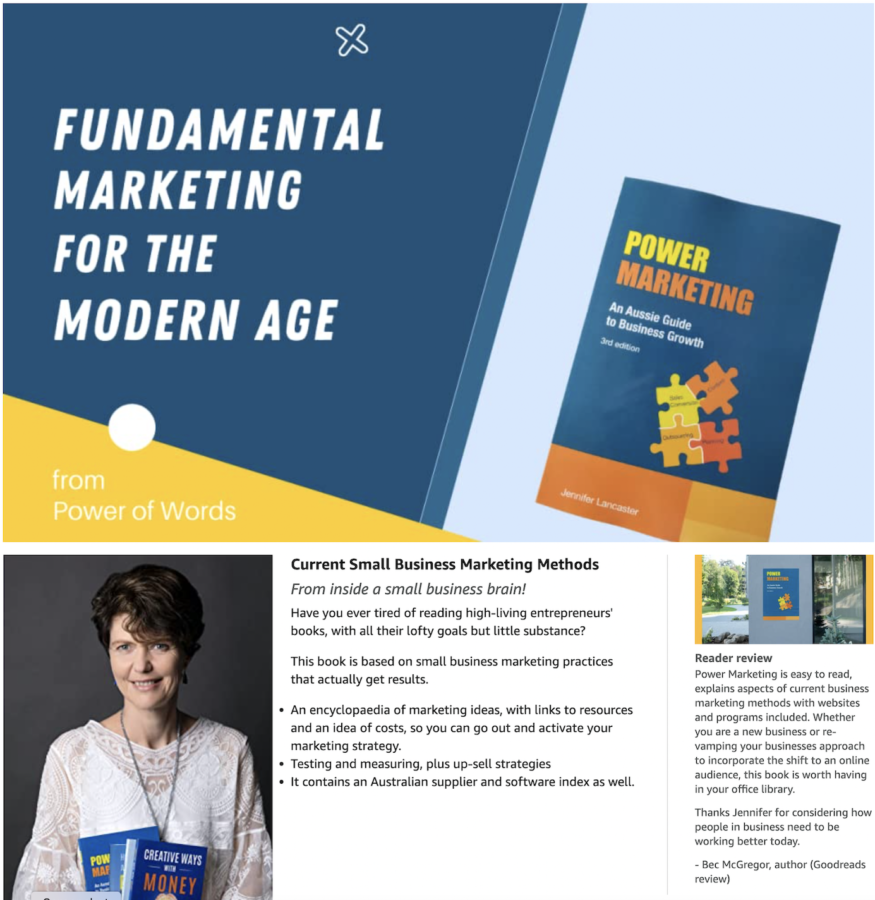
This enhancement is not advertising. It costs nothing to create, requires no Amazon Brand Registry membership, and does not need a Professional selling account. Any author with a book published through KDP is eligible. That distinction matters because a lot of self-publishing advice conflates the Seller Central A+ system, which does require Brand Registry, with the KDP-specific workflow. For your book, they are completely separate.
To access it, sign in to KDP and navigate to Marketing, then Manage A+ Content. Select your marketplace, add modules, upload images, apply your ASINs, and submit. One project can cover all formats of the same title, Kindle, paperback, and hardcover in a single submission. According to KDP’s help documentation, content takes up to eight business days to go live after approval, and you must submit separately for each marketplace where you want it to appear.
The gap between traffic and sales
Amazon states that Basic A+ Content is associated with a sales uplift of up to 8%, a figure Amazon describes as a general conversion improvement across its catalogue, not a book-specific guarantee. These numbers reflect conversion improvement only. The enhancement does not help readers find your book; it helps the readers who are already on your page decide to buy it.
Note that Premium A+ content, which Amazon associates with uplifts of up to 20%, is primarily a Seller Central feature and is generally not available to KDP authors. It requires a paid account. If you publish through KDP, focus on Basic A+ content like I do. The improvements available to you are still meaningful.
As I found by reviewing hundreds of listings, the detail page itself is often the weakest link. Does the listing itself answer simple questions buyers were silently asking: Who is this for? What will I gain? Why should I trust this author?
Many shoppers scan detail pages rather than read them from top to bottom. The A+ section is designed specifically for that behaviour, leading with visuals and structured modules that deliver the core message at a glance.
The modules that do the most work for nonfiction authors
KDP currently offers 17 module types, though you can only use five per layout. According to KDP’s module documentation, that constraint is useful, as it forces prioritisation. For nonfiction, three modules matter the most.
Standard Image and Text Overlay (hero banner)
The Standard Image and Text Overlay is the first thing a buyer sees in the A+ section. It needs to answer the question “What’s in it for me?” within two seconds. Write the headline in second person: “Build a client pipeline that works while you sleep”. State the transformation if you want it to sell.
This module has a minimum size of 970 × 300 px and a recommended export size of 1,940 × 600 px.
Standard Single Image with text
The Standard Single Image modules (left or right image with text) are the workhorses for author credentials and social proof. For nonfiction, the buyer is investing in your expertise, not just a story. Use this module to answer “Why should I trust this author?” with a short, relevant credential statement. Minimum size is 600 × 180 px; recommended is 600 × 600 px.
Standard Three Images and Text
The Standard Three Images and Text module works well for showcasing framework pillars, book chapters, or interior worksheets. It gives readers proof that the book is practical and structured, not just a collection of opinions. Each image has a minimum size of 300 × 300 px and a recommended size of 600 × 600 px.
Image requirements across all modules
Across all modules, keep these technical rules consistent: use JPG or PNG files in RGB colour mode, stay under 3 MB per image, and always preview on mobile before submitting. Text embedded in images shrinks dramatically on a phone, so keep any overlaid copy short and the font size generous.
How to submit your A+ content and when to get professional help
Ensure you do your designing first. The submission process is straightforward with this guide. Follow these steps in order:
- Sign in to KDP and navigate to Marketing, then Manage A+ Content.
- Select your marketplace and click Start Creating A+ Content.
- Name the project, select the content language, and add up to five modules.
- Upload images and add supporting text in each module’s text fields.
- Apply ASINs by clicking ‘Next: Apply ASINs’, searching for your title, and selecting all applicable formats.
- Preview the layout on both desktop and mobile views.
- Submit for approval and allow up to eight business days for review.
The process is simple enough, but the execution is where many authors run into trouble. A poorly designed page with pixelated images, mismatched fonts, or cluttered text modules can erode trust rather than build it. A flat listing with no A+ content is neutral. An amateur execution can actively work against you.
This is why professional design support can often pay for itself on a high-traffic listing.
Amazing Offer until 30 November 2026!
At Business Author Academy, we can create done-for-you Amazon A+ graphics built around your book’s brand and the specific outcomes your reader is buying. When buying a package of $6,000+ value, we can create other selling mockups too. The goal is a listing that looks professional, branded, and conversion-ready, without you spending weeks learning design software. (It helps to have an advance review ready.)
Your listing is not finished until the A+ page is live
Amazon A+ content is the most accessible conversion improvement a KDP author can make to an existing listing, and it costs nothing.
In my opinion, adding well-constructed A+ graphics consistently gives books a better chance of converting the readers who are already curious enough to click through, though results will vary depending on traffic levels, pricing, and review count. (Pretty much essential if using Amazon Advertising).
If your book is live and your listing still looks like a plain text block, possibly a whole wall of one paragraph, this is the first thing to fix. Why?
This is a conversion optimiser that works every day for free, without touching your advertising budget, and is already available inside your KDP dashboard. All it needs is the right content in the right modules.
If you want help getting it right, reach out to the team at Business Author Academy. Book a needs & options call and we’ll audit your listing together.